

In 2026, AI agents are getting the headlines. They can browse, click, write, summarize, and take action across multiple tools. That sounds impressive, and sometimes it is. But for many real business workflows, the better choice is still automation: predictable systems that do the same job the same way every time.
This is not an argument against AI. It is an argument against pretending every workflow needs a roaming agent. If a task is repetitive, sensitive, high volume, or tied to compliance, the flashy option is often the wrong one.
That matters because the public conversation around AI keeps jumping from capability to replacement. We keep hearing that AI will wipe out knowledge work, especially software engineering. But the data tells a more complicated story. So far, AI looks much more like a productivity multiplier than a mass replacement engine.
Two Doors, Two Futures
The image shows two doors and a crowd choosing the wrong one. The Automation door promises reliability, ROI, and scalability. The AI Agent door is crowded even though it comes with warnings about hallucinations, cost, and hype. This article explains why teams should think carefully before putting important workflows in the wrong line.

Table of Contents
- Why Everyone Is Rushing to AI Agents
- AI Agents vs Automation: What Is the Real Difference?
- Risk, Governance, and Compliance
- ROI: When Automation Wins
- The Jobs Narrative Is Running Ahead of the Data
- Data Privacy and Security: Why Guardrails Matter
- How cloudHQ Uses AI Without the Drama
- Real World Examples of Reliable Workflow Automation
- Frequently Asked Questions
Why Everyone Is Rushing to AI Agents
AI agents are the shiny object of 2026. They can browse the web, click buttons, write emails, answer customers, and chain tools together like a junior assistant who never sleeps.
The pitch is seductive: tell the agent the goal and let it figure out the rest. When teams are stretched thin and leadership keeps hearing that “agents will handle everything,” it is easy to mistake autonomy for progress.
In practice, many teams run into the same problems:
- Unpredictable behavior. Agents are probabilistic. They can guess, hallucinate, or misread instructions, and they often do it confidently.
- Heavy oversight. You need guardrails, testing, and constant monitoring just to keep them from doing something strange.
- Higher compute cost. Each “smart” decision is usually more expensive than a straightforward rule based step.
- Overkill for stable workflows. For processes like customer follow ups, inbox labeling, backup, or document exports, you rarely need a system that is constantly figuring things out. You need it to do the same thing every time.
That is why the crowd eventually rediscovers a simple truth: for a large share of business process automation, reliability still wins.
AI Agents vs Automation: What Is the Real Difference?
People often use AI and automation as if they mean the same thing. They do not.
What are AI agents?
AI agents are systems that can interpret a goal, choose steps, and act across tools with limited human supervision. You give them an outcome and they figure out the path. That can be helpful in open ended environments. It can also create risk, because the path is not always predictable.
What is automation?
Automation is rule based. A trigger happens, a defined workflow runs, and the result is consistent. You can still use AI inside the workflow, but only in narrow roles such as summarizing a message, classifying an email, or drafting text for review.
The simplest distinction is this: automation follows instructions, while agents interpret instructions. That sounds subtle, but it changes everything.
That is why automation wins so often in business critical workflows. It is easier to test, easier to explain, easier to monitor, and much easier to trust when something important is on the line.
Risk, Governance, and Compliance
Risk is where the “AI agents vs automation” conversation stops being theoretical. AI agents can shine in messy environments, but they create new kinds of exposure when you connect them to systems of record like Gmail, Google Drive, Dropbox, or internal file repositories.
Common risk patterns include:
- Operational risk. An agent sends the wrong email to the wrong person, edits the wrong folder, or archives a message that should have been retained.
- Governance risk. When someone asks, “Why did the system do that?” it is much harder to point to a clear rule.
- Compliance risk. Regulated industries need explainable decision paths. Agent behavior that changes from run to run is the opposite of what auditors want.
Deterministic automation behaves very differently. A clear rule like “If label X is applied, save the email as a PDF in folder Y” is explainable, testable, and repeatable. The same rule will fire tomorrow, next month, and next year in exactly the same way unless you change it.
A useful mental model is this: the higher the risk, the more your workflows should look like checklists, not experiments.
ROI: When Automation Wins
AI agents are most valuable when people are making repeated judgment calls over messy information. That might include research, synthesis, brainstorming, or first pass analysis. But that is not most business workflow automation.
For high volume tasks like email routing, follow ups, exports, backups, syncing, receipt capture, and document conversion, straightforward automation usually wins on cost, predictability, and time to value. These workflows do not need improvisation. They need consistency.
If a process is repeated constantly, touches sensitive data, or would be expensive to get wrong, rule based automation is usually the better foundation. AI can still help inside the process, but it should not be driving the car.
- Variability: Does the process change all the time, or is it mostly the same each day?
- Risk: If something goes wrong, is it merely annoying or actually expensive?
- Volume: How many times does this process run every week or month?
High variability can justify carefully governed AI agents. High risk and high volume usually point toward reliable workflow automation.
The Jobs Narrative Is Running Ahead of the Data
This is where the AI conversation often goes off the rails. People see what AI can theoretically do and assume that workers are about to disappear. That is a dramatic leap, and the data does not support it.
Anthropic’s latest labor market research is useful because it separates theoretical capability from observed real world usage. In its March 2026 report, Anthropic introduced “observed exposure,” a measure that combines what LLMs could do in theory with what people are actually doing with them in practice. The result is a much more grounded picture: AI is still far from its theoretical ceiling, and actual real world coverage remains much lower than the hype suggests.

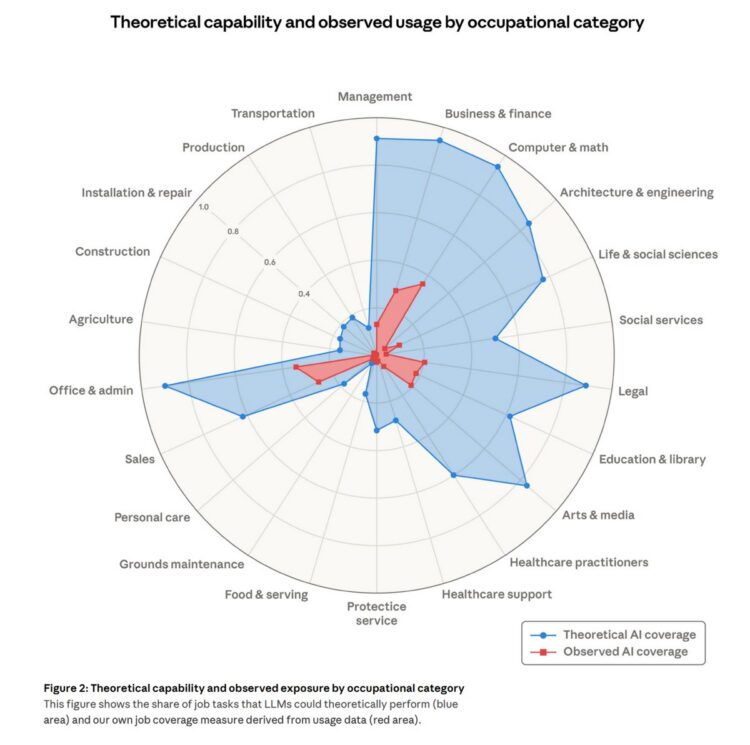
Anthropic’s March 2026 research shows a wide gap between theoretical AI capability and observed usage across occupations. Computer and math roles are highly exposed in theory, but observed real world coverage is still far lower.
That distinction matters. Exposure does not equal replacement. Anthropic explicitly says it finds no systematic increase in unemployment for highly exposed workers since late 2022. Its own workplace research also found that more than half of engineers could fully delegate only 0 to 20 percent of their work to Claude. Even inside Anthropic, AI looks more like a force multiplier than a full substitute for skilled technical work.

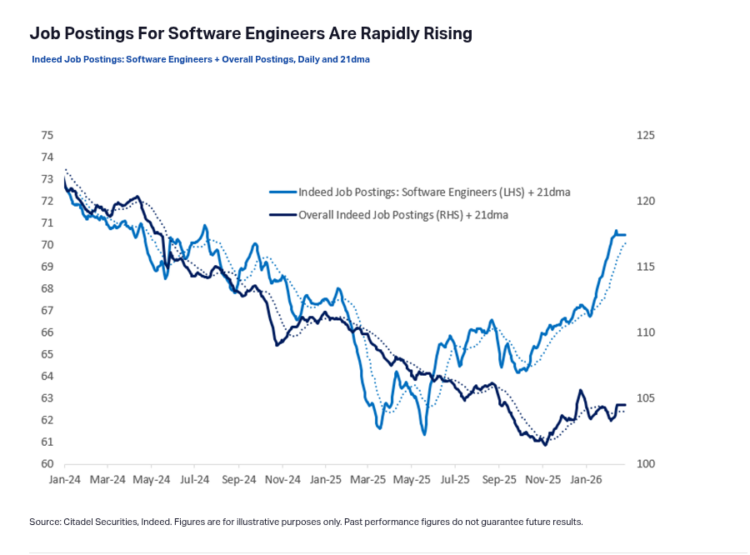
Citadel Securities highlighted in February 2026 that software engineer job postings were rising rapidly, up 11 percent year over year, even as the public narrative focused on imminent displacement.
Now compare that with actual hiring data. Citadel Securities wrote in February 2026 that software engineer job postings were rising rapidly, up 11 percent year over year, and argued that current labor market data shows little evidence of imminent displacement. That is a real mismatch with the loudest public narrative. If software engineering were already being broadly wiped out, you would not expect demand for software engineers to be rising at the same time.
The better reading is not that AI is irrelevant. It is that AI is changing the shape of work faster than it is eliminating workers. It is raising output, compressing some tasks, and changing expectations. That is not the same thing as replacement.
Data Privacy and Security: Why Guardrails Matter
Data privacy is where the AI agent line can feel especially risky. To be useful, agents often request broad access: entire inboxes, shared drives, or company wide file systems. That makes it harder to limit what they can see or what they might accidentally send to a third party model.
With deterministic automation, you can grant narrow, explicit permissions. A workflow can operate only on messages with a certain label, or only inside specific folders that you select. That smaller blast radius makes security reviews easier and reduces the impact of mistakes.
cloudHQ’s own security practices lean into this model. According to cloudHQ’s security documentation, files are not permanently stored on cloudHQ servers, connections are encrypted in transit, access is granted via OAuth and OpenID instead of passwords, and tokens are protected with AES 256 bit encryption. cloudHQ also states that customer data is not shared with third parties and that its privacy controls are designed around GDPR compliant governance.
If you compare that with an AI agent that needs sweeping workspace access and may send prompts and context to external models, the difference in control is hard to ignore.
How cloudHQ Uses AI Without the Drama
This is exactly where cloudHQ fits. We are not trying to hand your inbox, files, or follow ups to one giant black box and hope for the best. cloudHQ apps are built around deterministic workflows with clear scope, clear triggers, and behavior you can actually explain to another human.
Some features use AI, and that is the right move. But the AI stays inside guardrails. It helps with narrow jobs like classification, extraction, or drafting. It does not get free rein over your core workflows.
Instead of promising one magical agent that does everything, cloudHQ offers focused tools for specific jobs: saving emails to PDF, exporting conversations to Sheets, sharing labels across a team, backing up data, syncing files, tracking email opens, and more. That narrower scope is a feature, not a limitation.
- Predictable triggers. Automations run when you click a button, apply a label, or configure a sync.
- Clear scope. Every app has a clearly defined job.
- Security first. Data moves over encrypted connections using OAuth based access.
- Privacy by design. The platform is built for teams that care about governance and compliance.
The result is not a single black box agent. It is a toolbox of reliable workflow automation apps you can combine into a practical playbook for Gmail and cloud productivity.
Real World Examples of Reliable Workflow Automation
If this all sounds abstract, here is what the difference looks like in practice. These are the kinds of workflows where agents sound exciting, but automation usually wins.
1. Email follow ups you can fully control
Sales and customer success teams live and die by follow up. An AI agent could be told to “follow up on warm leads,” but that can go sideways if it misidentifies who is qualified or sends the wrong tone.
With structured email automation tools, you decide exactly who is in the sequence, what the messages say, how often they send, and when they stop. AI can assist with drafting if you want, but the sending logic remains deterministic.
2. Inbox organization you can audit
Letting an AI agent “clean up” your inbox sounds appealing until it archives a contract or mislabels something important. Because agents interpret intent, it can be difficult to reconstruct exactly why something moved.
By contrast, Gmail automation tools built on rules keep everything explainable. You can apply labels based on sender, keywords, domain, or recipient. You can save labeled emails into Google Docs, PDFs, or Sheets. You can share labels across a team so everyone sees the same organized view.
3. Document workflows with a narrow scope
AI agents often ask for broad access so they can help with anything. That is useful for brainstorming, but much riskier for document management.
cloudHQ’s backup and sync tools work differently. You choose the exact folders to connect between Google Workspace and services like Dropbox, Box, or OneDrive. You can set up one way backup, two way sync, or migration paths, and you know exactly what is in scope.
4. Receipt and invoice extraction that follows rules
A good example of AI productivity tools used correctly is receipt extraction. You do not need an open ended agent making guesses about where financial records belong. You need a dependable system that identifies receipts and invoices, extracts them, and puts them into a structured spreadsheet or archive you can review later.
That is exactly the kind of workflow where automation wins. It saves time, reduces manual work, and still keeps the process understandable.
AI Is Here to Help, Not to Replace
The biggest mistake companies can make in 2026 is confusing assistance with autonomy.
AI is already making people more productive. The data increasingly supports that. It is helping developers move faster, helping teams handle more work, and helping businesses cut time spent on low value tasks. But that does not mean every workflow should be handed over to an agent, and it does not mean people are suddenly obsolete. The real story, at least so far, is augmentation much more than replacement.
That is exactly why reliable automation is still growing in demand. Businesses still need systems that run on time, follow rules, protect data, and behave the same way today and tomorrow. For Gmail, Google Workspace, backups, exports, label sharing, follow ups, and receipt extraction, that matters a lot more than hype.
So if you are choosing between AI agents and automation, the answer is not to reject AI. It is to stop using AI where reliability matters more than improvisation. Use AI where it adds speed. Use automation where you need trust. That is how real teams scale without losing control.
Frequently Asked Questions
Are AI agents and automation mutually exclusive?
No. The most resilient systems often use both. Many teams rely on deterministic automation for the backbone of their operations, then add AI in narrow steps where it helps interpret messy input, summarize information, or support human decision making.
How should I decide between an AI agent and traditional automation?
Score each workflow on three dimensions: variability, risk, and volume. Highly variable workflows can benefit from agents. High risk and high volume workflows are usually better handled by rule based automation that behaves the same way every time.
Will AI agents replace office workers and software engineers?
Not in the simple way many headlines suggest. Current evidence shows a more nuanced picture: AI is increasing productivity and changing task mix, while hiring demand in some technical fields remains strong. In practice, many teams are using AI to work faster, not to eliminate people outright.
Why is cloudHQ a good fit for high risk, high volume workflows?
cloudHQ is designed for predictable, auditable automation around Gmail and cloud storage. Its apps handle tasks like email backup, syncing, receipt extraction, and document export under strong encryption and OAuth based access control. Because each tool has a specific job, it is easier to document what it does and prove that it fits your governance requirements.
Are cloudHQ apps secure for sensitive email and documents?
According to cloudHQ’s published security and privacy documentation, yes. Files are processed between services rather than permanently stored on cloudHQ servers, connections use encrypted SSL, access is granted through OAuth instead of passwords, and the platform is built around privacy and GDPR aligned controls.
How can I tie the meme directly into this article?
You can frame the entire piece around one question: “In 2026, which line are you in?” Then show that AI agents are exciting but often risky in real operations, while cloudHQ’s automation tools offer secure, reliable, ROI positive workflows for Gmail and cloud productivity without handing critical systems to a black box.
Sources: