

Table of Contents



Why Screenshots Matter More Than Words
- People process visual information up to 60,000 times faster than text
- Most misunderstandings in digital communication come from missing context
- Email, chat, and tickets often require multiple replies to clarify one detail
- Screenshots reduce back and forth by showing the exact issue or instruction
- A visual explanation is easier to understand, remember, and act on
Why Explaining With Text Breaks Down
Written explanations assume the reader sees the same thing you do. In reality, screens differ, pages scroll, menus hide, and details get missed. That is why instructions like “click the button on the right” or “scroll down a bit” often fail. What feels obvious to one person can be confusing to another. Screenshots remove ambiguity.
Instead of describing where something is, you show it. Instead of writing long explanations, you highlight the exact area that matters.
What a Screenshot Tool Should Actually Do
A modern screenshot tool should do more than just capture pixels. It should help you communicate clearly. Screenshot Tool by cloudHQ is designed for this purpose.


It works directly in your browser and lets you:
- Capture full pages, visible areas, windows, or selected regions
- Use timed captures for menus, tooltips, and hover states
- Add arrows, text, shapes, highlights, magnification, or blur
- Control image quality, colors, and clarity
- Share or save screenshots instantly
You are not just taking a screenshot. You are creating a visual explanation.
How to Capture Screenshots in Your Browser
Getting started is simple:
- Install Screenshot Tool from the Chrome Web Store
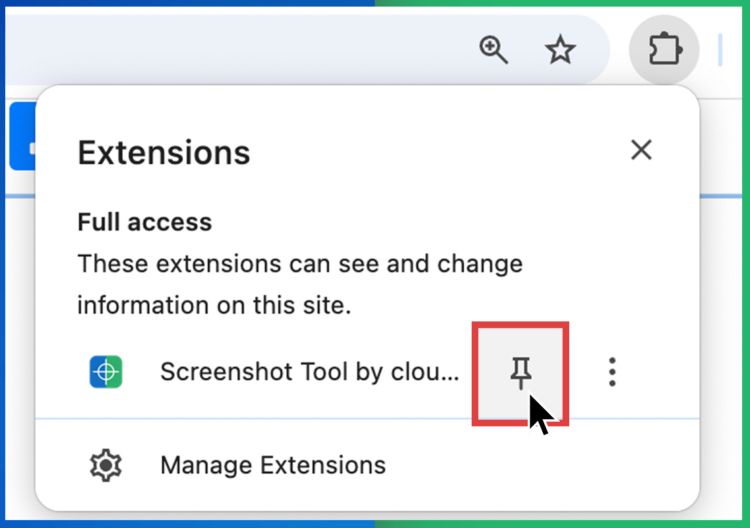
- Pin the extension to your browser toolbar
- Click the Screenshot Tool icon

- Select how you want to capture your screen
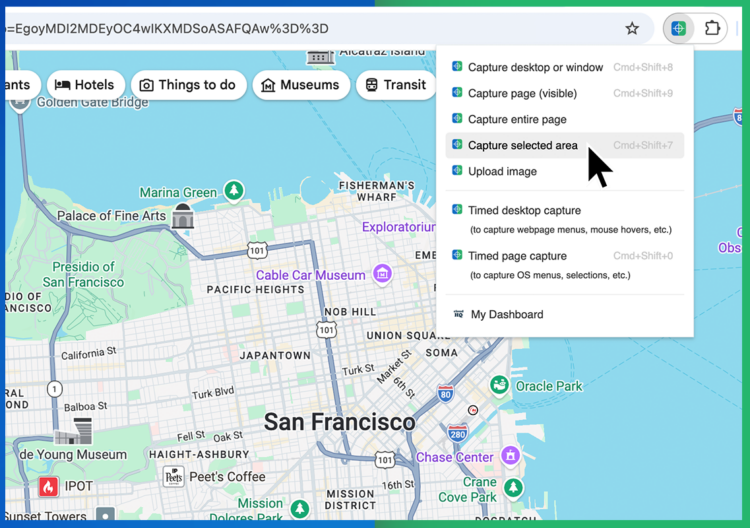


You can capture:
- The entire page, even below the fold
- Only what is currently visible
- A selected area
- Menus and hover states with timed capture
Mark Up Screenshots for Clarity
Once captured, your screenshot opens in an editor where you can immediately add context.

You can:
- Draw arrows to point attention
- Add text notes or labels
- Highlight or box important areas
- Magnify details
- Blur sensitive information
These tools turn a static image into a clear instruction.
Who Uses Screenshot Tools Daily
- Customer support teams explain steps, troubleshoot issues, and resolve tickets faster.
- Product managers and designers give visual feedback without long explanations.
- Sales teams highlight pricing, features, or changes clearly for prospects.
- Remote teams reduce misunderstandings across time zones.
- Anyone communicating online who wants fewer follow up messages.
Frequently Asked Questions
What is a screenshot tool?
A screenshot tool lets you capture what is on your screen and often annotate or share it. Screenshot Tool by cloudHQ focuses on clarity and communication, not just capture.
Does Screenshot Tool work only in Gmail?
No. It works anywhere in your browser and can be used from the pinned toolbar icon.
Can I edit screenshots after capturing?
Yes. You can re edit, annotate, or update screenshots before sharing or saving them.
Is Screenshot Tool free?
The extension is free to install and use. Additional features are available for advanced workflows.
A Clearer Way to Communicate Online
Most digital communication problems come down to one issue: people cannot see what you see.
Screenshot Tool solves that by letting you show, not explain.
Instead of long messages, confusing instructions, or repeated clarifications, you capture the screen, mark it up, and send it. Clear, fast, and easy.
Try Screenshot Tool today at www.gmail-screenshot.com