Amazon is holding emergency meetings. Engineers are being summoned. And the phrase “high blast radius” is appearing in internal briefing notes.
This is not a drill.
A wave of outages tied to AI assisted code changes has rattled AWS, the cloud infrastructure that quietly powers roughly 31% of the entire internet. On March 5, 2026, Amazon’s own “Add to Cart” button stopped working for six hours, generating over 77,000 outage reports. Amazon earns approximately $1.4 million per minute in online retail revenue. That afternoon cost them tens of millions of dollars in a single afternoon. And if you store your business data on Gmail, Google Drive, or any cloud platform, this is your wake up call.
Because here is the hard truth: a single AWS outage could wipe out more personal and business data than any hack in history. The October 2025 AWS outage alone took down over 1,000 companies simultaneously, with experts warning the aggregate losses could reach several billion dollars. And most people have no local backup at all.
Do you?
Table of Contents
- What Is Happening at AWS Right Now
- Why This Should Scare Every Business Owner
- What Data Is Actually at Risk
- How to Back Up Your Data Before It Is Too Late
- Step 1: Back Up Your Gmail Emails as PDF
- Step 2: Back Up Your Google Drive
- Step 3: Back Up All Your Cloud Data
- Frequently Asked Questions
- Stop Assuming Your Cloud Data Is Safe
What Is Happening at AWS Right Now
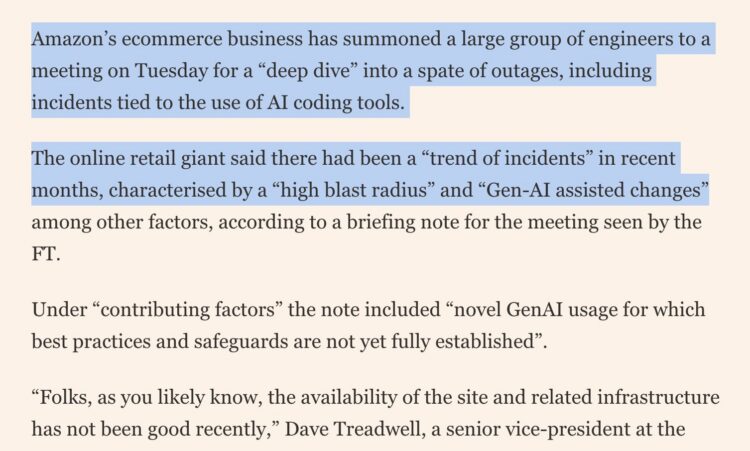
Amazon Web Services has summoned a large group of engineers to an emergency meeting to address a troubling trend of outages. According to a briefing note reported by the Financial Times, these incidents are characterized by a “high blast radius” and are tied to “Gen-AI assisted changes” for which “best practices and safeguards are not yet fully established.”
In plain English: AI is writing and deploying code at a scale and speed that humans cannot fully supervise, and it is breaking things. Big things. Critical infrastructure things.
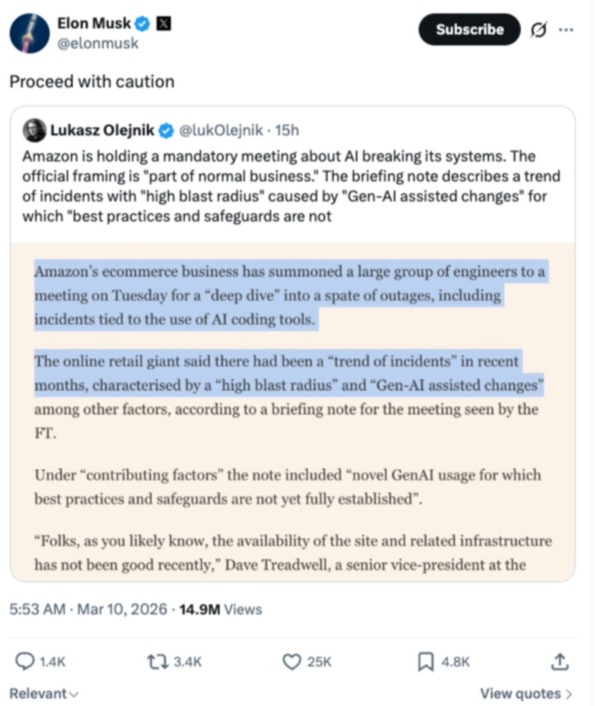
Even Elon Musk took notice, posting a simple “Proceed with caution” to his 220 million followers.
This is not a fringe tech issue. This is a systemic risk to every business that relies on cloud services, which at this point is nearly every business on earth.
And the numbers tell the story. Over the past two years, the companies responsible for storing your data have been systematically eliminating the engineers who kept those systems stable:
- Amazon laid off 14,000+ employees, with roughly 40% of cuts in key states hitting engineering roles directly
- Microsoft cut 15,000+ employees in 2025 alone, with engineers hit hardest, saving an estimated $1.5 billion annually
- Google eliminated between 15,000 and 20,000 roles since 2023 across Cloud, Android, and Chrome
- Dropbox cut 20% of its total workforce, the second year in a row it has done so
- Box has been conducting quiet layoffs as recently as January 2026, with no public WARN filings

These are not routine cost cuts. These are the people who caught bad deployments before they went live. Microsoft CEO Satya Nadella confirmed that AI now writes 20 to 30% of Microsoft’s code. Google’s Sundar Pichai put the figure at his company above 30%. The engineers are gone. The AI-generated code is shipping. And it is breaking things.
Why This Should Scare Every Business Owner
Most people think of cloud storage as inherently safe. The data is “up there.” It is backed up automatically. Someone else is managing it.
That assumption is increasingly dangerous.
Cloud providers like AWS, Google, and Microsoft operate at a scale where a single bad deployment can cascade across thousands of systems in minutes. The very speed that makes cloud infrastructure powerful is the same speed that makes it catastrophically vulnerable when something goes wrong.
And when it goes wrong at the infrastructure level, your data does not always come back.
Contracts. Client emails. Financial records. Project files. Years of business communication. Gone.
A bookmark does not save your data. A cloud subscription does not guarantee your data. The only thing that protects your data is a local backup you control.
What Data Is Actually at Risk
If you use any of the following, your data could be affected by an AWS or cloud infrastructure outage:
- Gmail and Google Workspace emails
- Google Drive files and folders
- Dropbox, OneDrive, or Box storage
- Any SaaS tool that runs on AWS infrastructure
- CRM data, project management tools, and collaboration platforms
The risk is not just outages. It includes accidental deletion, account lockouts, ransomware, and platform shutdowns. Any of these can happen with zero warning and zero recovery if you have no backup.
How to Back Up Your Data Before It Is Too Late
The good news is that backing up your most critical cloud data takes less than 10 minutes to set up. Here are the three steps every business should take today.
Step 1: Back Up Your Gmail Emails as PDF
Your email is your business paper trail. Contracts, confirmations, client communications, legal records. All of it lives in Gmail. And none of it is truly safe if Google or AWS goes down.
Save Emails as PDF by cloudHQ lets you convert your Gmail emails into clean, formatted PDF files that you can store locally, in Google Drive, Dropbox, OneDrive, or Box.
- Convert any email or entire email threads to PDF in one click
- Save directly to your local drive or cloud storage of choice
- Preserve formatting, attachments, and timestamps
- Works directly inside Gmail with no complicated setup
Step 2: Back Up Your Google Drive
Google Drive feels permanent. It is not.
Account suspensions, accidental deletions, ransomware attacks, and yes, infrastructure outages can all result in permanent data loss. If your business documents, presentations, spreadsheets, and shared files live exclusively in Google Drive, you are one bad day away from losing everything.
cloudHQ Google Drive Backup automatically backs up your entire Google Drive to a secure location you control. Set it once and it runs in the background without you having to think about it.
- Automatic, continuous backup of all Google Drive files
- Restore any file or folder from any point in time
- Works for individuals and entire teams
- No manual exports or complicated workflows
Step 3: Back Up All Your Cloud Data
Gmail and Google Drive are just the start. If your business runs on cloud tools, which almost every business does, your exposure is much wider than you think.
cloudHQ backs up data across all your critical cloud platforms including Gmail, Google Drive, Dropbox, OneDrive, Box, and more. One dashboard. Complete coverage. Total peace of mind.
cloudHQ offers over 60 free Gmail and cloud productivity apps designed to help you work smarter and protect your data. Backup is not an afterthought. It is built in.
- Back up Gmail, Google Drive, Dropbox, OneDrive, and Box Back up Microsoft 365 and/or Sharepoint
- Automatic and continuous backup with no manual effort
- Restore files, emails, and folders instantly
- Free to get started at cloudhq.net
Frequently Asked Questions
Can an AWS outage actually delete my data permanently?
In most cases cloud providers recover data after an outage. But recovery is not guaranteed, and it can take hours or days. During that time your business is effectively blind. The October 2025 AWS outage kept over 1,000 businesses offline simultaneously. A local backup means you never have to wait.
Is Google Drive safe enough on its own?
Google Drive is reliable but not infallible. Google has cut thousands of engineers from its Cloud division since 2023. Account lockouts, accidental deletions, and infrastructure failures can all result in data loss. A separate backup that you control is always the safer choice.
How long does it take to set up cloudHQ backup?
Most people are fully set up in under 10 minutes. The tools are designed to work directly inside Gmail and Google Drive with no technical knowledge required.
Is cloudHQ free?
Yes. cloudHQ offers free tools to get started including Save Emails as PDF and Google Drive Backup. Premium plans are available for advanced features and larger teams.
What is the difference between cloud storage and a cloud backup?
Cloud storage like Google Drive keeps your files accessible online. A cloud backup creates a separate, independent copy of those files that survives even if the original is deleted, corrupted, or inaccessible due to an outage.
Stop Assuming Your Cloud Data Is Safe
If Amazon cannot trust its own infrastructure, why would you trust anyone else’s?
The businesses that will be fine are the ones that took 10 minutes to set up a proper backup before something went wrong. The businesses that will not be fine are the ones that assumed someone else was handling it.
Do not wait for an outage to find out which one you are.
Back up your Gmail emails at save-emails-as-pdf.com
Back up your Google Drive and all cloud data at cloudhq.net