cloudHQ

Helping your productivity, 1 click at a time.

  • LinkedIn
  • Facebook
  • Twitter
Log in Sign up
MENUMENU
  • Home
  • Featured Apps
    • Export Emails to Google Sheets
    • Export Emails to Google Docs
    • Gmail Email Templates
    • Save Emails To PDF
    • Multi Email Forward
    • Email Campaigns and Mail Merge
  • Productivity
    • Auto Follow Up for Gmail
    • AutoBCC for Gmail
    • Email Signature Generator
    • Free Email Tracker
    • Free HTML Editor for Gmail
    • Free Screencast recording for Gmail
    • Gmail Label and Email Sharing
    • Gmail Phone
    • Gmail Screenshot
    • Gmail SMS Text Alerts
  • Google Workspace
    • Gmail
    • Google Apps
    • Google Docs
    • Google Sheets
    • Google Slides
    • Google Drive
    • Google Shared Drives
    • Google Contacts
  • Categories
    • Artificial Intelligence
    • Cloud Computing
    • Dropbox
    • Education
    • Egnyte
    • Google Chrome Web Store
    • More ...

Valentine’s Day Cards: Send Digital Greetings in Seconds

cloudHQ · Valentine's Day Cards: Send Digital Greetings in Seconds

Table of Contents

  1. Why Valentine’s Day Cards Still Matter
  2. What Are Valentine’s Day Cards?
  3. Digital Valentine’s Day Cards vs Traditional Cards
  4. Valentine’s Day Card Ideas for Every Relationship
    1. Cute Valentine’s Day Cards
    2. Funny Valentine’s Day Cards
    3. Valentine’s Day Cards for Kids
  5. How to Send Valentine’s Day eCards in Seconds
  6. Create and Send Valentine’s Day Cards Today
  7. Frequently Asked Questions About Valentine’s Day Cards

Valentine’s Day Video Transcript

This Valentine’s Day, don’t drop the ball. Send a great e-card in no time at all to your family, coworkers, besties and boos. cloudHQ’s templates are lovely to use. Pick a template, add a personal touch, and send it to those you love. In Gmail or Outlook, it brings so much style. From mobile to desktop, you’ll make someone smile. A laugh with your colleague, a pun for your hun, praise for your team, they’re all so much fun. This year your Valentine’s should make a splash. Get Valentine’s e-cards and send them in a dash. cloudHQ, helping your productivity one click at a time.


Browse Valentine's Day Cards and Valentine's Day eCards Collection

Why Valentine’s Day Cards Still Matter

Valentine’s Day is no longer only about romantic love. It is about appreciation, gratitude, and connection. A Valentine’s Day card can brighten your partner’s day, thank a client, surprise a friend, or remind a family member that they matter.
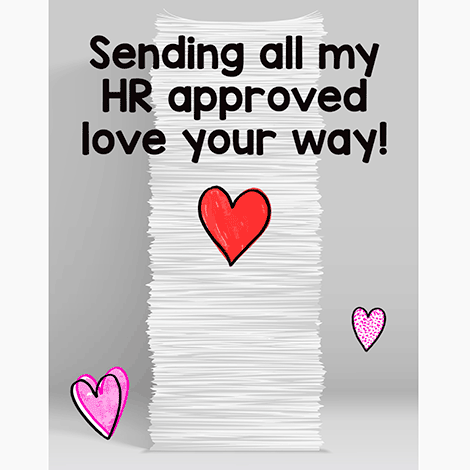
Valentine's Day card for coworkers and teams

Here is why Valentine’s Day cards continue to be powerful:

  • They stand out: Most people expect a quick text message. A Valentine’s Day card feels intentional and memorable.
  • They are saved: Digital Valentine’s Day cards and Valentine’s Day ecards can be kept, forwarded, and revisited.
  • They show effort: Sending a personalized Valentine’s Day eCard communicates genuine appreciation.
  • They create connection: A simple Valentine’s Day message can strengthen personal and professional relationships.

The best part is convenience. With digital Valentine’s Day ecards, you can send a beautifully designed greeting in seconds from your phone, desktop, Gmail, or Outlook.

Valentine's Day card for office coworkers

What Are Valentine’s Day Cards?

Valentine’s Day cards are greetings sent on February 14 to show appreciation, love, or gratitude. Today, they can be printed or sent digitally. Digital Valentine’s Day cards, often called Valentine’s Day ecards, can be personalized and delivered instantly through email platforms like Gmail or Outlook.
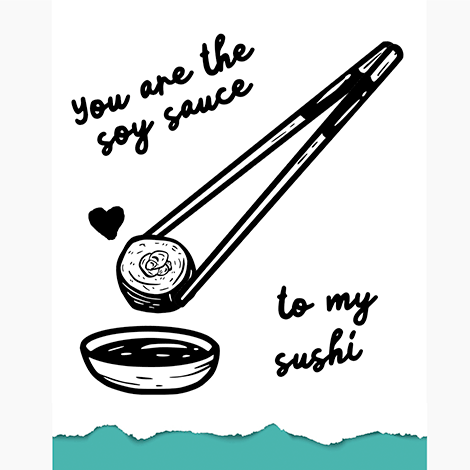
Valentine’s Day eCard example design

Digital Valentine’s Day Cards vs Traditional Cards

Traditional Valentine’s Day cards require shopping, stamps, and mailing time. Digital Valentine’s Day cards are faster than traditional paper cards and can be customized in under five minutes while preserving personalization and meaning.

Traditional Cards Digital Valentine’s Day Cards
Limited store selection Large online collection available anytime
Cost per card adds up Send multiple cards at no cost
Must mail days in advance Send instantly on Valentine’s Day
Risk of delivery delays Delivered immediately to inbox
Static design Modern designs with color and visual appeal
Handwritten only Easy to personalize and edit


Romantic Valentine's Day eCard design

Valentine’s Day Card Ideas for Every Relationship

Not every relationship calls for the same message. Choosing the right Valentine’s Day card ensures your greeting feels appropriate and meaningful.

Cute Valentine’s Day Cards

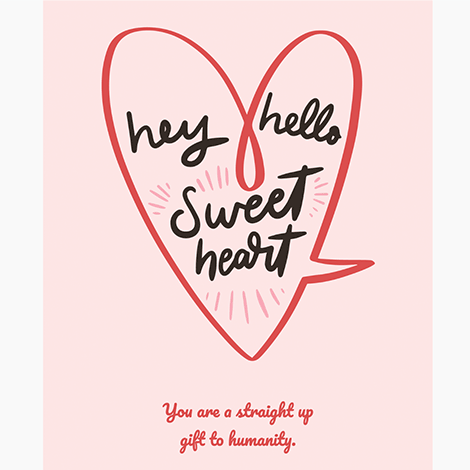
Cute Valentine’s Day cards are ideal for partners, friends, parents, and children. These designs often include hearts, soft colors, sweet treats, and playful illustrations.

  • Pastel color palettes
  • Illustrated animals
  • Sweet desserts and candy hearts
  • Lighthearted fonts and friendly messages

Cute Valentine's Day cards with playful design

Funny Valentine’s Day Cards

Funny Valentine’s Day cards use humor, puns, and playful messages. They work well for friends, siblings, coworkers, and partners who appreciate lighthearted communication.

  • Wordplay and puns
  • Short rhymes
  • Pop culture references
  • Friendly sarcasm

Funny Valentine's Day cards for friends and coworkers

Valentine’s Day Cards for Kids

Valentine’s Day cards for kids should be colorful, engaging, and easy to understand. Whether sending to your own children, nieces, nephews, or students, digital Valentine’s Day ecards make sharing fun effortless.

  • Bright colors
  • Recognizable characters
  • Simple, cheerful messages
  • Printable options for classroom sharing
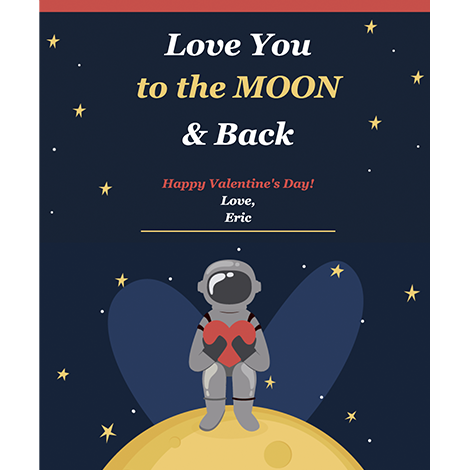
Valentine's Day cards for kids with colorful design

How to Send Valentine’s Day eCards in Seconds

Follow these simple steps to create and send Valentine’s Day ecards quickly using Gmail or Outlook.

Step 1: Install the Email Templates Extension

Install the Email Templates extension for Google Chrome or Microsoft Edge.
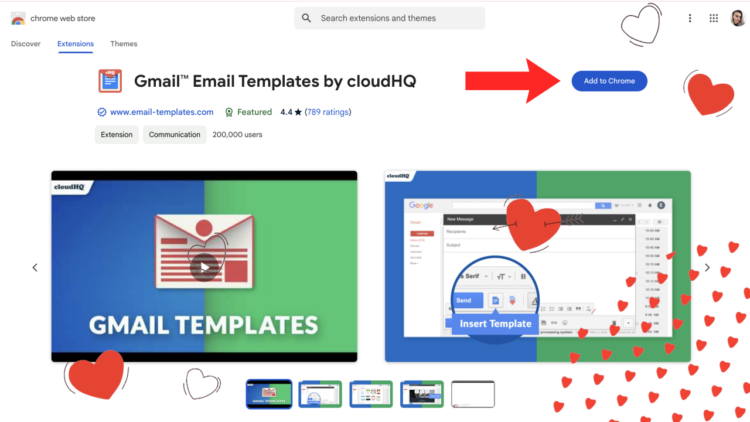
Install Valentine's Day cards extension

Step 2: Open Gmail or Outlook

In Gmail, click Compose to start a new email. Then click the Insert Email Template icon in the toolbar at the bottom of the message window.

In Microsoft Outlook or Microsoft 365, click the Insert Templates button to access your Valentine’s Day card templates.
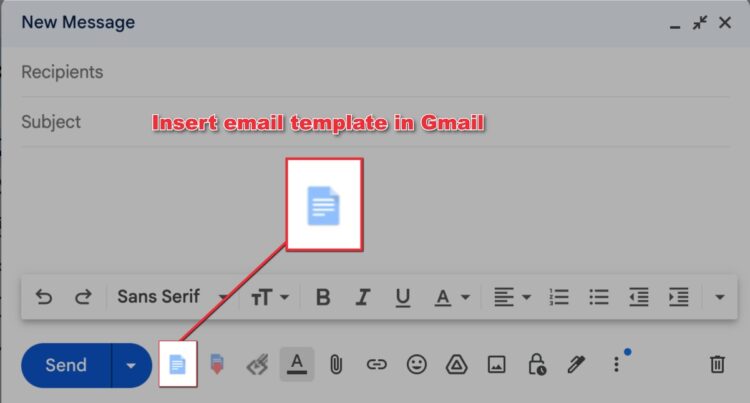
Compose Valentine's Day email in Gmail

Step 3: Browse Valentine’s Day Cards and eCards

Browse the Valentine’s Day cards and eCards collection. Click on the design you want to insert it directly into your email.
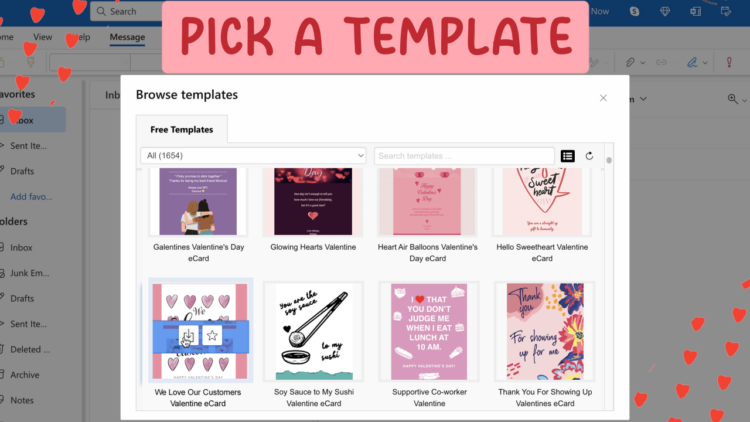
Select Valentine's Day eCard template

Step 4: Personalize Your Valentine’s Day eCard

Edit the text, add names, include a personal message, and tailor the greeting for your recipient.
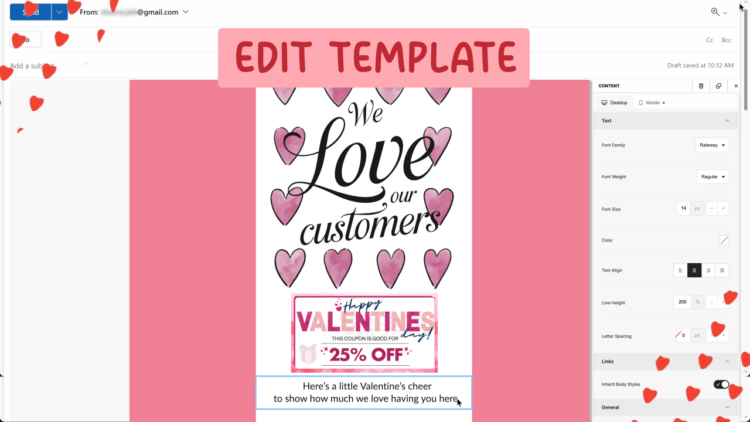
Customize Valentine's Day digital card

Step 5: Send or Schedule Your Valentine’s Day Card

Send your Valentine’s Day eCard immediately or schedule delivery for February 14.
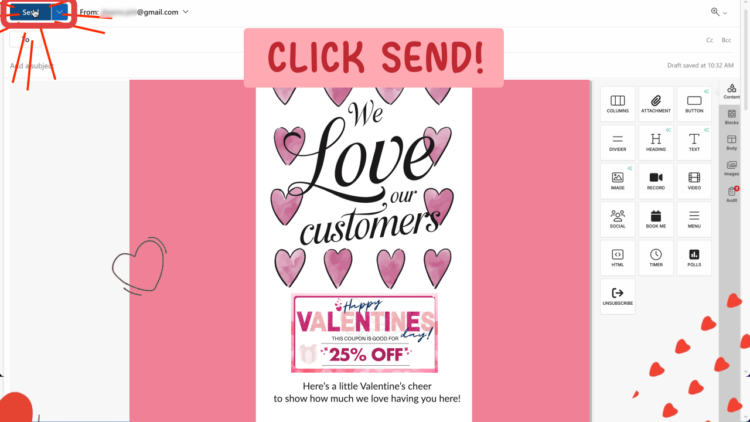
Send Valentine's Day eCard instantly

Create and Send Valentine’s Day Cards Today

Valentine’s Day cards are a simple way to express appreciation. Whether you choose cute Valentine’s Day cards, funny Valentine’s Day cards, or professional Valentine’s Day ecards, sending a digital greeting takes only minutes.

Browse the complete collection of Valentine’s Day cards and Valentine’s Day ecards to find the perfect design.

Start sending Valentine’s Day cards today. It takes less than five minutes and leaves a lasting impression.

Frequently Asked Questions About Valentine’s Day Cards

How do I send Valentine’s Day cards online?

To send Valentine’s Day cards online, choose a digital Valentine’s Day eCard, personalize your message, and send it through your email platform. With the Email Templates extension, you can insert and customize Valentine’s Day ecards directly inside Gmail or Outlook and send them instantly.

Are digital Valentine’s Day ecards appropriate for business?

Yes. Digital Valentine’s Day cards are appropriate for clients, coworkers, and business partners when the design and message are professional. Business Valentine’s Day cards are a thoughtful way to show appreciation, strengthen relationships, and stay top of mind.

Can I send Valentine’s Day cards from Gmail or Outlook?

Yes. You can create and send Valentine’s Day ecards directly from Gmail, Outlook.com, or Microsoft 365 using a browser extension. The card is inserted into your email, allowing you to personalize and send it without leaving your inbox.

What types of Valentine’s Day cards can I send?

You can send cute Valentine’s Day cards, funny Valentine’s Day cards, romantic Valentine’s Day cards, or professional Valentine’s Day ecards for business. Digital Valentine’s Day cards are available for partners, friends, kids, clients, and coworkers.

When should I send Valentine’s Day cards?

Most people send Valentine’s Day cards on February 14, but you can schedule your digital Valentine’s Day ecards in advance to arrive at the perfect time. Sending early can also help your message stand out.

Posted On: 2/11/2026By: Naomi Assaraf

Filed Under: Email Templates for Outlook and Gmail Tagged With: digital valentines day cards

View AMP version

Footer

cloudHQ Backup, Migration & Sync
cloudHQ Backup, Migration & Sync product can sync, back up, copy, migrate, convert, and replicates data between different cloud service providers.
GET STARTED
cloudHQ Apps

We all hate email, but still, spend most of our day there. Because of that, we created over 60 Gmail productivity tools to help keep you be productive in the email.
All cloudHQ Apps
Contact Us
  • Contact
  • Terms Of Service
  • Privacy
  • Security
  • Table of Content
Subscribe
©2026 cloudHQ - All Rights Reserved.

Categories

  • Amazon S3 (6)
  • Artificial Intelligence (34)
  • Auto Follow Up for Gmail (1)
  • Cloud Computing (214)
  • cloudHQ Apps (455)
    • Attach and Embed YouTube Video in Gmail (2)
    • Auto Follow Up for Gmail (6)
    • auto gmail follow up (4)
    • AutoBCC for Gmail (8)
    • Bulk Email Reply (1)
    • chatgpt for Gmail (13)
    • ChatGPT for Google (1)
    • ChatGPT Sidebar (2)
    • Combine Files to PDF (1)
    • Convert Google Docs To Gmail Drafts (1)
    • Convert PDF to MS Word (2)
    • Display Email Time by cloudHQ (1)
    • Download as PDF (1)
    • Email List Builder (20)
    • Email Privacy Protector: Is My Email Tracked? (4)
    • Email Reply Status (1)
    • Email Sender Icons (1)
    • Email Signature Generator (21)
    • Email Templates for Outlook and Gmail (15)
    • Email Tracking Blocker (2)
    • Email Zoom text Reader (2)
    • Export Emails to Google Docs (7)
    • Export Emails to Google Sheets (58)
    • Formatted Email Subject Lines (4)
    • Free Email Tracker (20)
    • Free HTML Editor for Gmail (3)
    • Free Mail Tracker (5)
    • Free Pause Gmail (4)
    • Free Screencast recording for Gmail (11)
    • Get My Receipts (3)
    • Gmail Auto Label (4)
    • Gmail Button (5)
    • Gmail Conversation Thread Reversal (1)
      • Gmail conversation view (1)
    • Gmail Copilot (8)
    • Gmail Email Links (3)
    • Gmail Email Templates (89)
    • Gmail Free Online Polls & Surveys by cloudHQ (4)
    • Gmail Inbox Zero (1)
    • Gmail Label and Email Sharing (25)
    • Gmail Message Preview (1)
    • Gmail Notes (3)
    • Gmail Phone (2)
    • Gmail Screenshot (14)
    • Gmail SMS Text Alerts (13)
    • gmail snippets (2)
    • Gmail Tables (3)
    • Gmail Tabs (5)
    • Gmail Time Tracker (3)
    • Gmail URL Link Preview (5)
    • Gmail Web Clipper (1)
    • Google Docs Templates (15)
    • Google Forms Templates (2)
    • Google Slides Theme Templates (1)
    • Happy Mother's Day Cards (5)
    • Highlight Emails in Gmail (1)
    • Hubspot Templates in Gmail (1)
    • MailKing Email Campaigns and Mail Merge (68)
    • mailking: send mass text from email text message SMS marketing campaigns (16)
    • mailto: (1)
    • meeting scheduler (32)
    • Multi Email Forward (8)
    • Multi Email Forward for Gmail (21)
    • Resize Gmail Sidebar (2)
    • save and backup my emails (1)
    • Save Emails To Box (2)
    • Save Emails To Dropbox (3)
    • Save Emails To Egnyte (3)
    • Save Emails To Google Drive (8)
    • Save Emails To OneDrive (2)
    • Save Emails To OneDrive Business (2)
    • Save Emails To OneNote (2)
    • Save Emails To PDF (43)
    • Save Emails To Salesforce (3)
    • Save Emails To SharePoint (6)
    • Save My Email (1)
    • Save My Emails (3)
    • Send Your Email to SMS (text) (6)
    • Share & Attach Files In Gmail (2)
    • Simple email view (4)
    • Sort Gmail inbox by (5)
    • Sync Google Drive With Dropbox (3)
    • Sync Salesforce Contacts To Google (2)
    • Tiny Sketchbook (3)
    • Unique URL Links for Email Conversations (4)
    • Valentines Day (2)
    • Video Email (9)
    • webspage to pdf (1)
  • cybersecurity (1)
  • Dropbox (73)
  • Education (8)
  • Egnyte (9)
  • Email Templates Gmail (4)
  • Email Templates Outlook (4)
  • Google Chrome Web Store (4)
  • Google Sheets Templates (3)
  • Google Workspace (195)
    • Gmail (69)
    • Google AI (3)
    • Google Apps (40)
    • Google Contacts (1)
    • Google Docs (56)
    • Google Drive (73)
    • Google Shared Drives (1)
    • Google Sheets (17)
    • Google Slides (9)
  • Happy Easter Cards (1)
  • HTML editor for Google Drive (1)
  • Microsoft 365 (3)
  • microsoft sharepoint (2)
  • Mobile Text Alerts for Gmail (1)
  • Outlook Email Templates (4)
  • Productivity (1)
  • technology (1)
  • Text Editor for Google Drive (1)